Architecture
This document describes the internal architecture of Simpesys, including core data structures and the build pipeline.
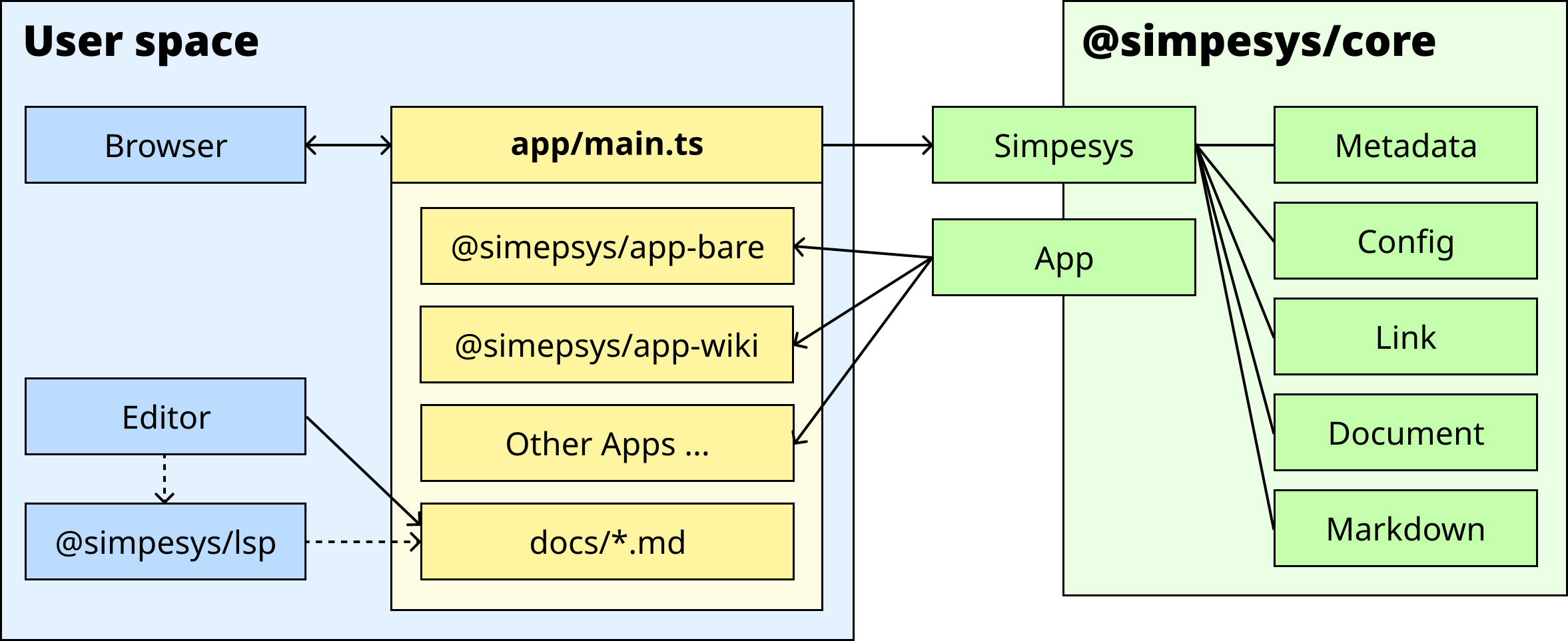
Simpesys is composed of three main layers. The user space is the layer where users build Simpesys projects, edit documents, and interact directly with application. The Simpesys core defines the essential components of the document system and implements the build pipeline for Simpesys projects. This core logic is distributed as the @simpesys/core package. Finally, the application layer bridges the user space and the Simpesys core. An application serves as the interface through which users actually interact with the document system, and is itself a Simpesys project that contains documents. In that sense, the application can be considered part of the user space. The entry point of an application is the app/main.ts file.
Core Components
Simpesys core processes Markdown documents through a multi-stage pipeline. The system maintains a document dictionary that maps document keys to processed document objects. During initialization, documents are traversed through breadth-first search starting from the root document.
Simpesys
The Simpesys class is the main entry point. It manages document loading and processing, and provides access to the processed document dictionary.
class Simpesys {
  constructor({ config, hooks }: DeepPartial<Context>);
  init(options?: { syncMetadata?: boolean }): Promise<Simpesys>;
  getDocuments(): DocumentDict;
  getDocument(key: string): Document | undefined;
  getConfig(): Config;
}
The constructor accepts a partial configuration. Unspecified options use default values. The init() method must be called before accessing documents.
Context
The Context type combines configuration and hooks into a single object passed to internal functions.
type Context = {
  config: Config;
  hooks: Hooks;
};
For details on available options, see the Configuration document.
Document
The Document interface represents information about a built document.
| Property | Type | Description |
|---|---|---|
title |
string |
Document title extracted from the first level 1 heading |
filename |
string |
Document key (filename without extension) |
markdown |
string |
Markdown document content |
html |
string |
HTML converted from Markdown |
breadcrumbs |
Breadcrumb[] |
Path from root |
children |
Document[] |
Subdocuments |
parent |
Document |
Parent document |
referred |
Reference[] |
Documents that reference this document |
type |
"subject" | "publication" |
Document classification |
createdAt |
Temporal.Instant |
Creation timestamp |
updatedAt |
Temporal.Instant |
Last modification timestamp |
DocumentDict
The DocumentDict type is a record that maps document keys to Document objects:
type DocumentDict = Record<string, Document>;
A document key is a unique identifier derived from the relative path from the root document without the .md extension. For example, the key for features/internal-links.md is features/internal-links.
Reference
The Reference interface represents a backlink relationship.
interface Reference {
  document: Document; // Document containing the link
  sentences: string[]; // Sentences mentioning the link
}
Build Pipeline
Initialization proceeds through the following stages:
Document Traversal
Starting from the root document, all documents are traversed using breadth-first search, with each document processed as follows:
- Read the Markdown file from the filesystem.
- If a
manipulateMarkdownhook is defined, execute it to modify the Markdown. - Extract the document title from the first level 1 heading.
- Load or create metadata timestamps.
- Add the document to the dictionary.
- Add subdocuments listed in the subdocuments section to the processing queue.
Link Resolution
After all documents are traversed, internal links are processed:
- Resolve and label internal links in each document.
- Match links against the document dictionary.
- If there are unresolved links and an
onInternalLinkUnresolvedhook is defined, execute it to handle the error. - For each valid link, add a backlink reference to the target document.
HTML Conversion
Finally, each document is converted to HTML:
- Add backlinks section.
- Insert table of contents before the title.
- Convert Markdown to HTML.
- Replace internal link syntax with HTML anchor tags using the
renderInternalLinkhook.
Document Types
Documents are classified into two types:
| Type | Description |
|---|---|
subject |
Subject document |
publication |
Publication document |
The type affects how documents are displayed in the subdocuments section and can be customized in custom rendering logic. By default, documents mentioned under a level 3 Publications heading are classified as publication documents. The publication section title can be configured using the config.docs.publicationsSectionTitle option.
Backlinks
- Simpesys
-
For more detailed explanation of Simpesys’ architecture, see the Architecture document.
-